Flyway
Flyway versions the database schema alongside the application, so a deployment brings the schema with it instead of relying on someone remembering to run a script.
It records every applied migration in a flyway_schema_history table and
refuses to start if what it finds there disagrees with the migrations on the
classpath.
Migration types
Versioned
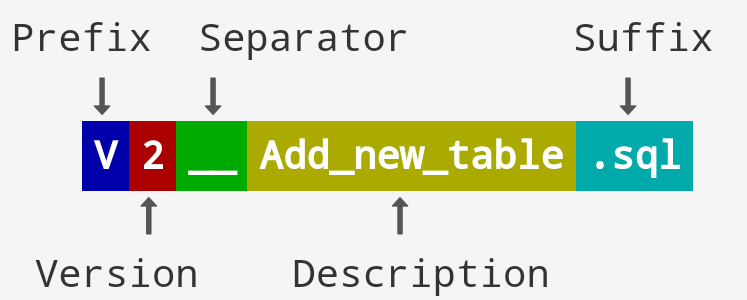
Prefix V, applied exactly once, in version order.
V1.0__create_user_table.sql
V1.1__add_email_column.sql
Undo
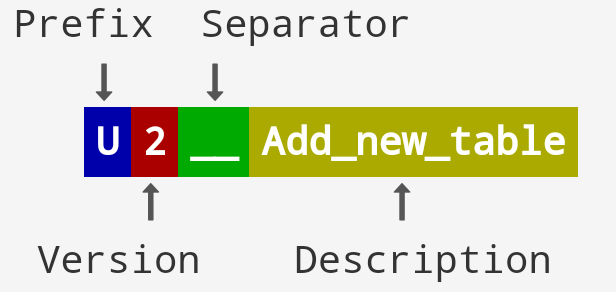
Prefix U, reverses the versioned migration with the matching version. This is
a Flyway Teams (commercial) feature — the open-source edition will not apply
them.
U1.1__drop_email_column.sql
Rolling forward with a new versioned migration is the usual approach on the
free edition, and is safer in production regardless: an undo cannot restore data
that a DROP COLUMN destroyed.
Repeatable
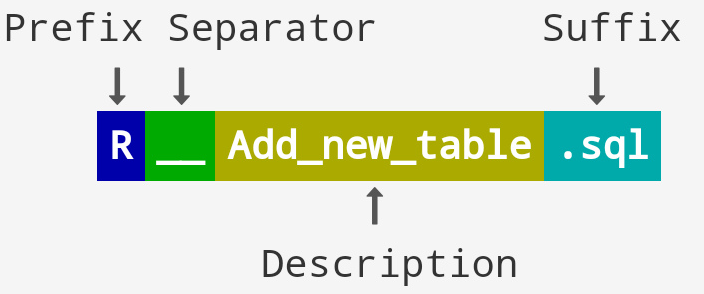
Prefix R, no version, re-applied whenever the file's checksum changes. Runs
after all pending versioned migrations.
R__refresh_views.sql
R__stored_procedures.sql
Suited to objects that can be recreated from scratch — views, stored procedures,
functions. Write them with CREATE OR REPLACE, since they will run again.
Naming
V  1.1  __  add_email_column  .sql
│   │       │                  └── suffix
│   │       └── description; underscores become spaces in the log
│   └── version; dots or underscores separate parts
└── prefix: V versioned, U undo, R repeatable
The separator is two underscores. One underscore is the single most common reason a migration is silently ignored.
Configuration
spring.flyway.enabled=true
spring.flyway.baseline-version=1.0
spring.flyway.target=1.2
# Per-vendor SQL; {vendor} resolves to h2, postgresql, mysql, ...
spring.flyway.locations=classpath:/db/migration/{vendor}
With that locations value, H2 scripts live in
src/main/resources/db/migration/h2 and PostgreSQL scripts in
.../postgresql. The default without {vendor} is
classpath:db/migration.
Splitting by vendor is only necessary where the dialects genuinely differ. Duplicated scripts drift apart, so keep shared migrations in one location and add a vendor-specific location only for the statements that need it:
spring.flyway.locations=classpath:/db/migration/common,classpath:/db/migration/{vendor}
baseline-on-migrate=true is needed when introducing Flyway to a database that
already has tables — it records the current state as the baseline instead of
failing. Leave it off afterwards; left enabled, it masks a genuinely empty
database.
Maintenance
# Inspect the migration state
mvn flyway:info -Ph2         # maps to application-h2.properties
mvn flyway:info -Ppostgre    # maps to application-postgre.properties

# Repair the schema history table
mvn flyway:repair
flyway:repair does two things: it removes failed migration entries, and it
realigns stored checksums with the files currently on disk. It does not
touch the schema itself. Reaching for it because a checksum mismatch appeared is
usually wrong — the mismatch means an already-applied migration file was edited,
and the correct fix is to restore the file and add a new migration.
Never edit an applied migration. Once it has run anywhere other than your own machine, it is immutable.
Startup fails on checksum mismatch
Validate failed: Migration checksum mismatch for migration version 1.1
Someone changed a file after it was applied. In order of preference:
- Restore the original file and express the change as a new migration.
- If the database is disposable (local development), drop it and re-migrate.
- Only as a last resort, and never automatically in production, run
flyway:repairto accept the new checksum.
Setting spring.flyway.validate-on-migrate=false makes the error disappear and
the drift permanent. It is not a fix.