OAuth 2.0 Authorization Server
Spring Authorization Server is the supported implementation. The older
spring-security-oauth2 project and its @EnableAuthorizationServer
annotation reached end of life and were removed — code still using them has to
be migrated, not upgraded.
implementation 'org.springframework.boot:spring-boot-starter-oauth2-authorization-server'
SecurityFilterChain
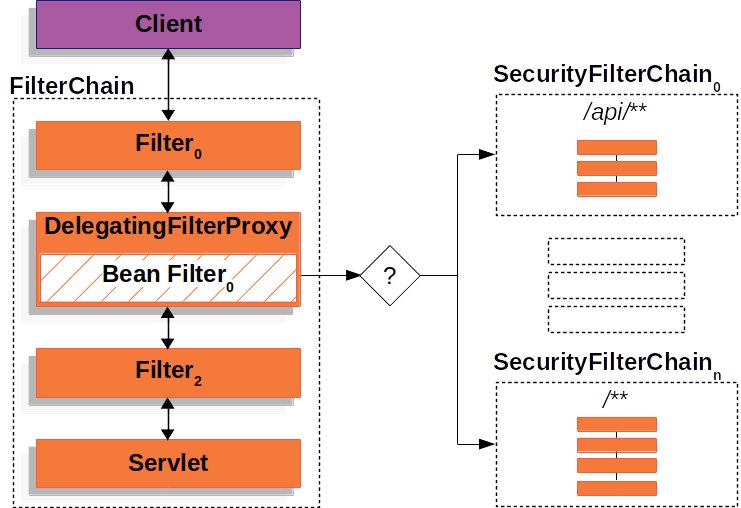
Figure. SecurityFilterChain
Multiple chains
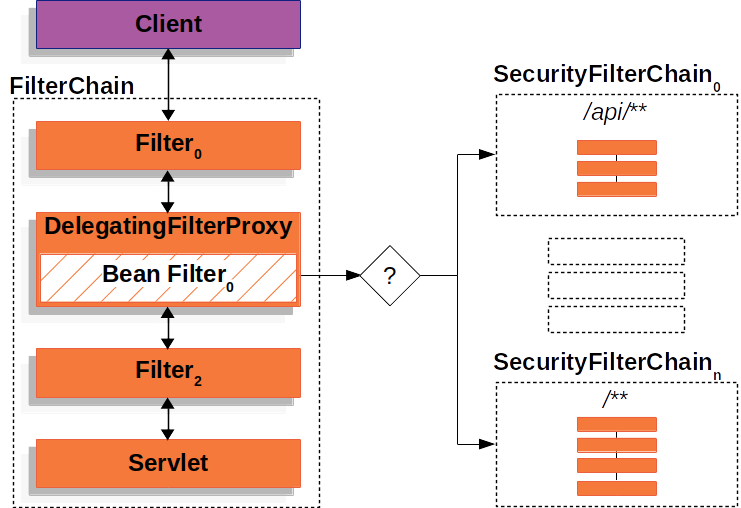
Figure. Multiple SecurityFilterChain
FilterChainProxy picks the chain to apply using each chain's
securityMatcher. The first chain whose matcher accepts the request handles it,
and no further chain is consulted — so ordering decides behaviour whenever
matchers overlap.
@Order sets that order. The authorization server's own endpoints need the
lowest number so they are matched before any catch-all chain.
@Bean
@Order(1)
SecurityFilterChain authorizationServerSecurityFilterChain(HttpSecurity http) throws Exception {

    OAuth2AuthorizationServerConfigurer authorizationServerConfigurer =
            OAuth2AuthorizationServerConfigurer.authorizationServer();

    return http
            .securityMatcher(authorizationServerConfigurer.getEndpointsMatcher())
            .with(authorizationServerConfigurer, Customizer.withDefaults())
            .authorizeHttpRequests(auth -> auth.anyRequest().authenticated())
            .csrf(csrf -> csrf.ignoringRequestMatchers(
                    authorizationServerConfigurer.getEndpointsMatcher()))
            .exceptionHandling(ex -> ex.authenticationEntryPoint(
                    new LoginUrlAuthenticationEntryPoint("/login")))
            .build();
}

@Bean
@Order(2)
SecurityFilterChain defaultSecurityFilterChain(HttpSecurity http) throws Exception {
    return http
            .authorizeHttpRequests(auth -> auth.anyRequest().authenticated())
            .formLogin(Customizer.withDefaults())
            .build();
}
Points about this configuration:
.with(configurer, ...)replaces the removed.apply(configurer), and the.and()-chained style it used to be written in no longer compiles on Spring Security 6.1+.- CSRF is disabled only for the authorization server endpoints. They are authenticated by client credentials rather than by session, so CSRF protection does not apply; leaving it off for the whole application would be a genuine vulnerability.
- The
authenticationEntryPointis what redirects an unauthenticated user to the login page when they hit/oauth2/authorize. Without it the endpoint returns 401 and the browser flow dead-ends. - Permitting the endpoints outright with
permitAll()looks tempting but breaks the authorization code flow, which requires an authenticated resource owner.
Default endpoints
Authorization Server 1.0 and later:
| Endpoint | Path |
|---|---|
| Authorization | /oauth2/authorize |
| Token | /oauth2/token |
| Token revocation | /oauth2/revoke |
| Token introspection | /oauth2/introspect |
| JWK set | /oauth2/jwks |
| Authorization server metadata | /.well-known/oauth-authorization-server |
| OIDC provider configuration | /.well-known/openid-configuration |
| Device authorization | /oauth2/device_authorization |
The two .well-known documents let clients discover everything else, which is
the recommended way to configure them — hard-coded endpoint paths break when the
issuer changes.
Worked example
An authorization code flow, driven by hand to see each step.
Log in
http://127.0.0.1:8080/login
Authenticate with an in-memory user.
Request authorization
http://127.0.0.1:8080/oauth2/authorize
    ?response_type=code
    &client_id=client-demo
    &scope=message.read%20message.write
    &redirect_uri=http://127.0.0.1:8080/authorized
Approve the requested scopes. The browser is redirected to redirect_uri
carrying the code.
The openid scope is special: requesting it engages OpenID Connect, and the
request fails if the OIDC provider is not configured. Enable OIDC or leave the
scope out.
In a real client, add PKCE parameters here — code_challenge and
code_challenge_method=S256 — and the matching code_verifier at the token
step. See OAuth 2.0.
Read the code
http://127.0.0.1:8080/authorized?code=UHRK...idFY
Authorization codes are single-use and short-lived, typically under a minute. Reusing one is treated as an attack and invalidates any token already issued from it.
Exchange the code for a token
POST http://127.0.0.1:8080/oauth2/token, as
application/x-www-form-urlencoded, with the client credentials in an HTTP
Basic header:
grant_type=authorization_code
code=UHRK...idFY
redirect_uri=http://127.0.0.1:8080/authorized
curl -X POST http://127.0.0.1:8080/oauth2/token \
     -u client-demo:secret \
     -d grant_type=authorization_code \
     -d code=UHRK...idFY \
     -d redirect_uri=http://127.0.0.1:8080/authorized
redirect_uri must be byte-identical to the one sent in the authorization
request, including any trailing slash. A mismatch returns invalid_grant.
Call the resource
GET http://127.0.0.1:8080/api/status
Authorization: Bearer eyJr...y60g
Verify the signature
The JWK Set contains the public keys used to verify tokens the authorization server signed — with RS256 by default.
GET http://127.0.0.1:8080/oauth2/jwks
Note this is /oauth2/jwks, not the token endpoint.
{
    "keys": [
        {
            "kty": "RSA",
            "e": "AQAB",
            "kid": "e77a5129-c5cc-4210-b3a3-62c8d466c653",
            "n": "xf1z....eoDQ"
        }
    ]
}
To check a token on jwt.io, paste a single key rather than the
whole set — unwrap one element from the keys array:
{
    "kty": "RSA",
    "e": "AQAB",
    "kid": "e77a5129-c5cc-4210-b3a3-62c8d466c653",
    "n": "xf1z....eoDQ"
}
Paste it into Verify Signature ▸ Public Key; the page reports Signature Verified.
Pick the key whose kid matches the token header's kid when the set holds
more than one — that is what the field is for, and it is how key rotation works.
Do not paste production tokens into a website. Use a local library, or a token minted specifically for the test.
Related
- OAuth 2.0 — grant types, client credentials, PKCE.
- JWT — token structure and validation.
- Spring Security — filter chain configuration.