STM32MP135F-DK
MPU: Arm Cortex‑A7 32-bit
RAM: 0.5 GB(4-Gbit) DDR3L, 16 bits, 533 MHz
LCM: 4.3" 480×272 pixels LCD display module with capacitive touch panel and RGB interface
Boot: Support -optee.tsv, not support -trusted.tsv
OpenSTLinux
Components
STM32MPU-ecosystem-v6.0.0 5.0.3-openstlinux-6.6-yocto-scarthgap-mpu-v24.11.06 (Scarthgap) components:
OpenEmbedded v5.0.3 (Scarthgap) - Updated GCC version v13.3.0 - Updated Embedded software components Linux kernel v6.6-stm32mp-r1 (v6.6.48) - Updated TF-A v2.10-stm32mp-r1 - Updated U-Boot v2023.10-stm32mp-r1 - Updated OP-TEE 4.0.0-stm32mp-r1 - Updated External DT 6.0-stm32mp-r1 - Updated OpenOCD version v0.12.0 Applicative components Weston version v13.0.1 - Updated Wayland version 1.22.0 - Updated GStreamer version v1.22.12 - Updated GCnano version v6.4.19 - Updated
STM32MPU-ecosystem-v5.1.0 openstlinux-6.1-yocto-mickledore-mpu-v24.06.26 (Mickledore) components:
OpenEmbedded v4.2.4 (Mickledore) - Updated GCC version v12.3.0 - Updated Embedded software components Linux kernel v6.1-stm32mp-r2 (v6.1.82) - Updated TF-A v2.8-stm32mp-r2 - Updated U-Boot v2022.10-stm32mp-r2 - Updated OP-TEE 3.19.0-stm32mp-r2 - Updated External DT 5.0-stm32mp-r1 - New OpenOCD version v0.12.0 - Updated Applicative components Weston version v11.0.1 - Updated Wayland version 1.21.0 - Updated GStreamer version v1.22.6 - Updated GCnano version v6.4.15 - Updated
Common
Support: Ubuntu 22.04
sudo apt update
sudo apt dist-upgrade
sudo apt install git curl
git config --global user.email "[email protected]"
git config --global user.name "RojarSmith"
sudo sed -i -e 's/set compatible/set nocompatible/' /etc/vim/vimrc.tiny

mkdir -p bin
curl https://storage.googleapis.com/git-repo-downloads/repo > bin/repo
chmod a+x bin/repo
echo 'export PATH=~/bin:$PATH' >> ~/.bashrc
source ~/.bashrc

mkdir stm32mpws
echo 'export STM32MPWS=~/stm32mpws' >> ~/.bashrc
source ~/.bashrc

# Target Board's IP
echo 'export TBIP=192.168.50.96' >> ~/.bashrc
source ~/.bashrc
STM32MP1-Ecosystem-v6.0.0
Support: Ubuntu 22.04
STM32CubeProgrammer
cd $STM32MPWS
mkdir $STM32MPWS/tmp;cd $STM32MPWS/tmp
## Copy file, `Skip All` with VMware
unzip en.stm32cubeprg-lin-v2-18-0.zip
./SetupSTM32CubeProgrammer-2.18.0.linux
which STM32_Programmer_CLI
## Confirm ~/STMicroelectronics/STM32Cube/STM32CubeProgrammer/bin/STM32_Programmer_CLI
echo 'export PATH=~/STMicroelectronics/STM32Cube/STM32CubeProgrammer/bin:$PATH' >> ~/.bashrc
source ~/.bashrc

pushd ~/STMicroelectronics/STM32Cube/STM32CubeProgrammer/Drivers/rules
sudo cp *.* /etc/udev/rules.d
popd

STM32_Programmer_CLI --h
Starter Package
cd $STM32MPWS
mkdir $STM32MPWS/starterpkg;cd $STM32MPWS/starterpkg
## Copy file, `skip all` with VMware
mkdir osl6.6
tar -xvf en.FLASH-stm32mp1-openstlinux-6.6-yocto-scarthgap-mpu-v24.11.06.tar.gz -C osl6.6 --strip-components=1

osl6.6/images/stm32mp1/scripts/create_sdcard_from_flashlayout.sh osl6.6/images/stm32mp1/flashlayout_st-image-weston/optee/FlashLayout_sdcard_stm32mp135f-dk-optee.tsv
sudo dd if=osl6.6/images/stm32mp1/FlashLayout_sdcard_stm32mp135f-dk-optee.raw of=/dev/sdb bs=8M status=progress conv=fdatasync
# Must remove SDCARD safely
sudo eject /dev/sdb

## Board $>

cat /etc/build

##
-----------------------
Build Configuration:  |
-----------------------
BB_VERSION = 2.8.0
BUILD_SYS = x86_64-linux
NATIVELSBSTRING = universal
TARGET_SYS = arm-ostl-linux-gnueabi
MACHINE = stm32mp1
DISTRO = openstlinux-weston
DISTRO_VERSION = 5.0.3-openstlinux-6.6-yocto-scarthgap-mpu-v24.11.06
TUNE_FEATURES = arm vfp cortexa7 neon vfpv4 thumb callconvention-hard
TARGET_FPU = hard
MANIFESTVERSION = ostl-v6.0-4-g08429ce6dd12739ca248fa2f56c67af6bfdb3e20
DISTRO_CODENAME = scarthgap
ACCEPT_EULA_stm32mp1 = 1
GCCVERSION = 13.%
PREFERRED_PROVIDER_virtual/kernel = linux-stm32mp
-----------------------
Layer Revisions:      |
-----------------------
meta-python       = v6.0.xml:1235dd4ed4a57e67683c045ad76b6a0f9e896b45
meta-oe           = v6.0.xml:1235dd4ed4a57e67683c045ad76b6a0f9e896b45
meta-gnome        = v6.0.xml:1235dd4ed4a57e67683c045ad76b6a0f9e896b45
meta-multimedia   = v6.0.xml:1235dd4ed4a57e67683c045ad76b6a0f9e896b45
meta-networking   = v6.0.xml:1235dd4ed4a57e67683c045ad76b6a0f9e896b45
meta-webserver    = v6.0.xml:1235dd4ed4a57e67683c045ad76b6a0f9e896b45
meta-st-stm32mp   = v6.0.xml:32707c26d139d3583a3f14564899c7bfc4f9aa7e
meta-st-openstlinux = v6.0.xml:fd3ef2feb59ad51694464eaa058b5c8fb1e24111
meta              = v6.0.xml:236ac1b43308df722a78d3aa20aef065dfae5b2b
##
Developer Package
cd $STM32MPWS
mkdir $STM32MPWS/developerpkg;cd $STM32MPWS/developerpkg

# Packages required by OpenEmbedded/Yocto
sudo apt-get install gawk wget git git-lfs diffstat unzip texinfo gcc-multilib  chrpath socat cpio python3 python3-pip python3-pexpect debianutils iputils-ping python3-git python3-jinja2 libegl1-mesa libsdl1.2-dev pylint xterm bsdmainutils
sudo apt-get install libssl-dev libgmp-dev libmpc-dev lz4 zstd

# Developer Package
sudo apt-get install build-essential libncurses-dev libncurses5 libyaml-dev libssl-dev

sudo apt install python-is-python3

sudo apt-get install coreutils bsdmainutils sed curl bc lrzsz corkscrew cvs subversion mercurial nfs-common nfs-kernel-server libarchive-zip-perl dos2unix texi2html libxml2-utils

# Support up to 16 partitions per MMC
echo 'options mmc_block perdev_minors=16' > /tmp/mmc_block.conf
sudo mv /tmp/mmc_block.conf /etc/modprobe.d/mmc_block.conf

## Copy file, `skip all` with VMware
mkdir osl6.6
tar -xvf en.SDK-x86_64-stm32mp1-openstlinux-6.6-yocto-scarthgap-mpu-v24.11.06.tar.gz -C osl6.6 --strip-components=1
chmod +x osl6.6/sdk/st-image-weston-openstlinux-weston-stm32mp1.rootfs-x86_64-toolchain-5.0.3-openstlinux-6.6-yocto-scarthgap-mpu-v24.11.06.sh

# Installation
./osl6.6/sdk/st-image-weston-openstlinux-weston-stm32mp1.rootfs-x86_64-toolchain-5.0.3-openstlinux-6.6-yocto-scarthgap-mpu-v24.11.06.sh -d SDK

source SDK/environment-setup-cortexa7t2hf-neon-vfpv4-ostl-linux-gnueabi

## checks ensure that the environment is correctly set up
echo $ARCH
echo $CROSS_COMPILE
$CC --version
echo $OECORE_SDK_VERSION

mkdir $STM32MPWS/developerpkg/stm32mp1-openstlinux-24.11.06
mkdir $STM32MPWS/developerpkg/stm32mp1-openstlinux-24.11.06/sources
mkdir $STM32MPWS/developerpkg/stm32mp1-openstlinux-24.11.06/sources/gtk_hello_world_example
cd $STM32MPWS/developerpkg/stm32mp1-openstlinux-24.11.06/sources/gtk_hello_world_example
touch gtk_hello_world.c
touch Makefile
gtk_hello_world.c
#include <gtk/gtk.h>

static void
print_hello (GtkWidget *widget,
             gpointer   data)
{
  g_print ("Hello World\n");
}

static void
activate (GtkApplication *app,
          gpointer        user_data)
{
  GtkWidget *window;
  GtkWidget *button;
  GtkWidget *button_box;

  window = gtk_application_window_new (app);
  gtk_window_set_title (GTK_WINDOW (window), "Window");
  gtk_window_set_default_size (GTK_WINDOW (window), 200, 200);

  button_box = gtk_button_box_new (GTK_ORIENTATION_HORIZONTAL);
  gtk_container_add (GTK_CONTAINER (window), button_box);

  button = gtk_button_new_with_label ("Hello World");
  g_signal_connect (button, "clicked", G_CALLBACK (print_hello), NULL);
  g_signal_connect_swapped (button, "clicked", G_CALLBACK (gtk_widget_destroy), window);
  gtk_container_add (GTK_CONTAINER (button_box), button);

  gtk_widget_show_all (window);
}

int
main (int    argc,
      char **argv)
{
  GtkApplication *app;
  int status;

  app = gtk_application_new ("org.gtk.example", G_APPLICATION_DEFAULT_FLAGS);
  g_signal_connect (app, "activate", G_CALLBACK (activate), NULL);
  status = g_application_run (G_APPLICATION (app), argc, argv);
  g_object_unref (app);

  return status;
}
Makefile
PROG = gtk_hello_world
SRCS = gtk_hello_world.c

CLEANFILES = $(PROG)

# Add / change option in CFLAGS and LDFLAGS
CFLAGS += -Wall $(shell pkg-config --cflags gtk+-3.0)
LDFLAGS += $(shell pkg-config --libs gtk+-3.0)

all: $(PROG)

$(PROG): $(SRCS)
	$(CC) -o $@ $^ $(CFLAGS) $(LDFLAGS)

clean:
	rm -f $(CLEANFILES) $(patsubst %.c,%.o, $(SRCS))
make

# Push this binary onto the board (Ethernet connection needed)
scp gtk_hello_world root@$TBIP:/usr/local/app_gtk_hello_world
## Are you sure you want to continue connecting (yes/no/[fingerprint])? yes

## Board $>

su -l weston -c "/usr/local/app_gtk_hello_world"

## The GTK App will open the window on the screen.

### To SDCARD

pushd /media/dev/userfs
sudo cp $STM32MPWS/developerpkg/stm32mp1-openstlinux-24.11.06/sources/gtk_hello_world_example/gtk_hello_world app_gtk_hello_world
# Must remove SDCARD safely
sudo eject /dev/sdb
popd
Modify, rebuild and reload the Linux kernel
cd $STM32MPWS
mkdir $STM32MPWS/developerpkg;cd $STM32MPWS/developerpkg
## Copy file, `skip all` with VMware
mkdir osl6.6
tar -xvf en.SOURCES-stm32mp1-openstlinux-6.6-yocto-scarthgap-mpu-v24.11.06.tar.gz -C osl6.6 --strip-components=1
cd $STM32MPWS/developerpkg/osl6.6/sources/arm-ostl-linux-gnueabi/linux-stm32mp-6.6.48-stm32mp-r1-r0
tar xvf linux-6.6.48.tar.xz

cd $STM32MPWS/developerpkg/osl6.6/sources/arm-ostl-linux-gnueabi/linux-stm32mp-6.6.48-stm32mp-r1-r0/linux-6.6.48
git init
git add -A -f
git commit -m "clean 6.6.48"
git status
git log

# Apply ST patches
for p in `ls -1 ../*.patch`; do patch -p1 < $p; done

# Configure build directory
export OUTPUT_BUILD_DIR=$PWD/../build
mkdir -p ${OUTPUT_BUILD_DIR}

# Apply fragments
make O="${OUTPUT_BUILD_DIR}" defconfig fragment*.config
for f in `ls -1 ../fragment*.config`; do scripts/kconfig/merge_config.sh -m -r -O ${OUTPUT_BUILD_DIR} ${OUTPUT_BUILD_DIR}/.config $f; done
(yes '' || true) |  make oldconfig O="${OUTPUT_BUILD_DIR}"

# Select which kind of image to build regarding the SDK installed
[ "${ARCH}" = "arm" ] && imgtarget="uImage" || imgtarget="Image.gz"
export IMAGE_KERNEL=${imgtarget}

# Build kernel images ([uImage|Image.gz] and vmlinux) and device tree (dtbs)
make ${IMAGE_KERNEL} vmlinux dtbs LOADADDR=0xC2000040 O="${OUTPUT_BUILD_DIR}" -j 8

# Build kernel module
make modules O="${OUTPUT_BUILD_DIR}" -j 8

# Generate output build artifacts
make INSTALL_MOD_PATH="${OUTPUT_BUILD_DIR}/install_artifact" modules_install O="${OUTPUT_BUILD_DIR}"
mkdir -p ${OUTPUT_BUILD_DIR}/install_artifact/boot/
cp ${OUTPUT_BUILD_DIR}/arch/${ARCH}/boot/${IMAGE_KERNEL} ${OUTPUT_BUILD_DIR}/install_artifact/boot/
find ${OUTPUT_BUILD_DIR}/arch/${ARCH}/boot/dts/ -name 'st*.dtb' -exec cp '{}' ${OUTPUT_BUILD_DIR}/install_artifact/boot/ \;

## Deploy the Linux kernel on the board
cd ${OUTPUT_BUILD_DIR}/install_artifact
scp -r boot/* root@$TBIP:/boot/

# Remove the link created inside the install_artifact/lib/modules/<kernel version> directory
rm lib/modules/6.6.48/build
# Or
rm lib/modules/6.6.48-g77af50506ac4-dirty/build

# Optionally, strip kernel modules (to reduce the size of each kernel modules)
find . -name "*.ko" | xargs $STRIP --strip-debug --remove-section=.comment --remove-section=.note --preserve-dates

# Copy kernel modules
scp -r lib/modules/* root@$TBIP:/lib/modules

## Board $>

# Using the Linux console, regenerate the list of module dependencies (modules.dep) and the list of symbols provided by modules (modules.symbols)
# rm -R /lib/modules/6.6.48-g0452b1ba943a-dirty
/sbin/depmod -a
# Synchronize data on disk with memory
sync
# Reboot the board
reboot

### Modify a built-in Linux kernel device driver

## This simple example adds unconditional log information when the display driver is probed.
## Using the Linux console, check that there is no log information when the display driver is probed

## Board $>

dmesg | grep -i stm_drm_platform_probe
## Ack is nothing

## PC $>

# Go to the Linux kernel source directory
cd $STM32MPWS/developerpkg/osl6.6/sources/arm-ostl-linux-gnueabi/linux-stm32mp-6.6.48-stm32mp-r1-r0/linux-6.6.48
./drivers/gpu/drm/stm/drv.c
static int stm_drm_platform_probe(struct platform_device *pdev)
{
	struct device *dev = &pdev->dev;
	struct drm_device *ddev;
	int ret;
	[...]

    drm_fbdev_dma_setup(ddev, 16);

	DRM_INFO("Simple example - %s\n", __func__);

	return 0;
	[...]
}
# Rebuild the Linux kernel
make ${IMAGE_KERNEL} LOADADDR=0xC2000040 O="${OUTPUT_BUILD_DIR}" -j 8
# Update the Linux kernel image into board
scp ${OUTPUT_BUILD_DIR}/arch/${ARCH}/boot/${IMAGE_KERNEL} root@$TBIP:/boot

## Board $>

# Reboot the board
reboot

# Check that log information is now present when the display driver is probed
dmesg | grep -i stm_drm_platform_probe
[    2.764080] [drm] Simple example - stm_drm_platform_probe
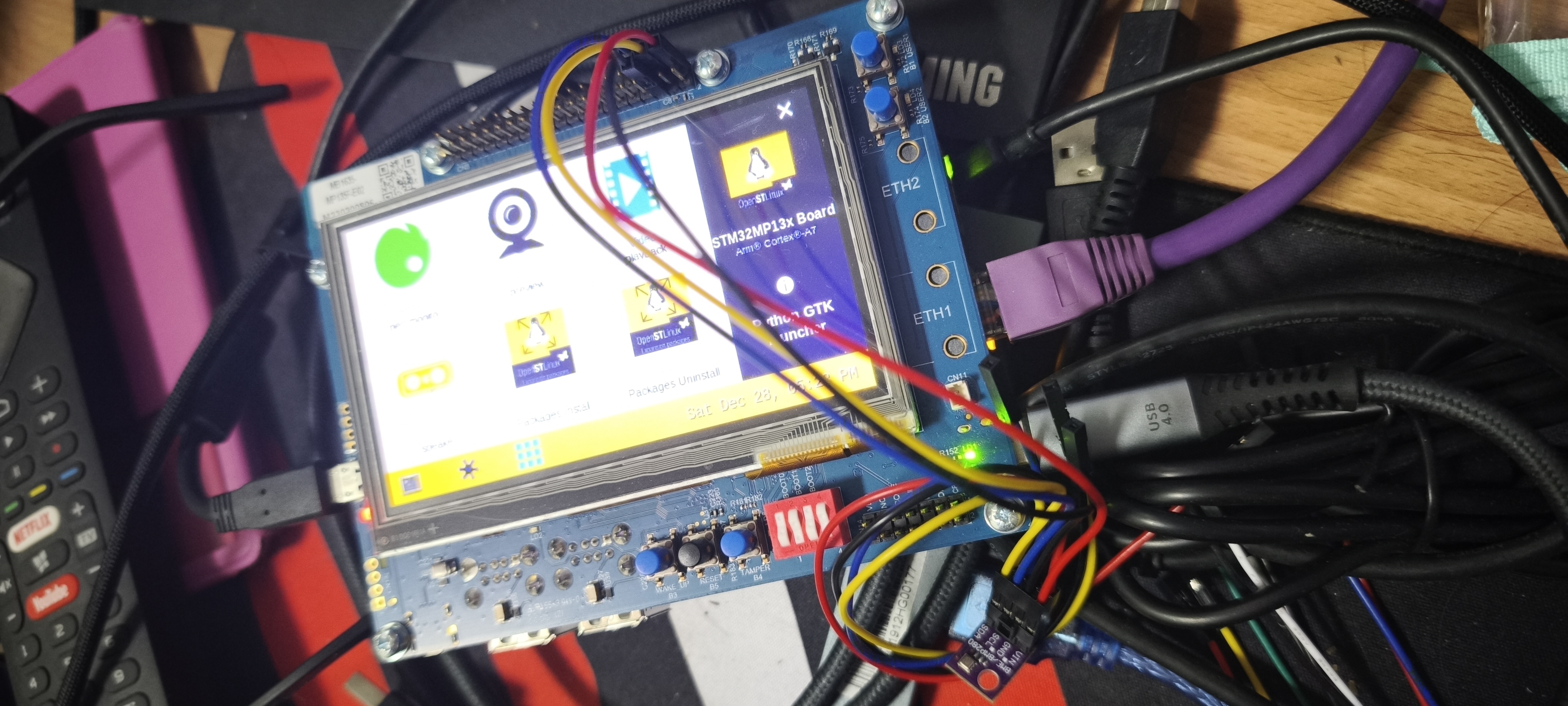
BMP280 sensor with I2C
cd $STM32MPWS/developerpkg/osl6.6/sources/arm-ostl-linux-gnueabi/linux-stm32mp-6.6.48-stm32mp-r1-r0

# At front of the board, pin2pin to the sensor board
3V3      Pin 1
I2C5_SDA Pin 3
I2C5_SCL Pin 5
GND      Pin 6

Relate files - source:

Driver
linux-6.6.48/drivers/iio/pressure/bmp280-core.c

Device Tree, dts
linux-6.6.48/arch/arm/boot/dts/st/stm32mp135f-dk.dts

#include "stm32mp135.dtsi"
#include "stm32mp13xf.dtsi"
#include "stm32mp13-pinctrl.dtsi"

Relate files - build:

Build Device Tree, dtb
build/install_artifact/boot/stm32mp135f-dk.dtb
build/arch/arm/boot/dts/st/stm32mp135f-dk.dtb
linux-6.6.48/arch/arm/boot/dts/st/
stm32mp135.dtsi -> stm32mp133.dtsi -> stm32mp131.dtsi
Each I2C range is 1KB == 0x0 ~ 0x3FF, ref STM32MP135 datasheet.
i2c1: i2c@40012000
i2c2: i2c@40013000
etzpc: bus@5c007000 {
    i2c3: i2c@4c004000
    i2c4: i2c@4c005000
    i2c5: i2c@4c006000
}
stm32mp135f-dk.dts
Goodix touch controller I2C address 0x5d.
&i2c1 {
    ...
}
&i2c5 {
    ...
	goodix: goodix-ts@5d {
		compatible = "goodix,gt911";
		reg = <0x5d>;
		pinctrl-names = "default";
		pinctrl-0 = <&goodix_pins_a>;
		interrupt-parent = <&gpiof>;
		interrupts = <5 IRQ_TYPE_EDGE_FALLING>;
		AVDD28-supply = <&scmi_v3v3_sw>;
		VDDIO-supply = <&scmi_v3v3_sw>;
		touchscreen-size-x = <480>;
		touchscreen-size-y = <272>;
		status = "okay" ;
	};
}
Enable I2C5 bus:
&i2c5 {
	status = "okay";
	clock-frequency = <100000>;
	pinctrl-names = "default", "sleep";
	pinctrl-0 = <&i2c5_pins_a>;
	pinctrl-1 = <&i2c5_pins_sleep_a>;
};
# All I2C related devices
ls -l /sys/bus/i2c/devices/

total 0
lrwxrwxrwx 1 root root 0 Dec 28 03:47 0-0021 -> ../../../devices/platform/soc/40012000.i2c/i2c-0/0-0021
...
lrwxrwxrwx 1 root root 0 Dec 28 03:47 1-005d -> ../../../devices/platform/soc/5c007000.bus/4c006000.i2c/i2c-1/1-005d
lrwxrwxrwx 1 root root 0 Dec 28 03:47 i2c-0 -> ../../../devices/platform/soc/40012000.i2c/i2c-0
lrwxrwxrwx 1 root root 0 Dec 28 03:47 i2c-1 -> ../../../devices/platform/soc/5c007000.bus/4c006000.i2c/i2c-1

## APB5 > ETZPC registers: 0x5C007000 - 0x5C0073FF
## APB6 > I2C registers: 0x4C006000 - 0x4C0063FF
## i2c-1 symbolic link shows it’s the I2C controller at base address 0x4C006000, so it’s I2C5 in the datasheet
## The I2C devices: 1-005d. These entries have the form B-SSSS where B is the bus number and SSSS is the I2C address of the device. So you can see that for example 1-005d corresponds to the Goodix GT911.

# I2C5 -> i2c-1
i2cdetect -y 1
# GT911 at 0x5d
##
     0  1  2  3  4  5  6  7  8  9  a  b  c  d  e  f
00:                         -- -- -- -- -- -- -- --
10: -- -- -- -- UU -- -- -- -- -- -- -- -- -- -- --
20: -- -- -- -- -- -- -- -- -- -- -- -- -- -- -- --
30: -- -- -- -- -- -- -- -- -- -- -- -- -- -- -- --
40: -- -- -- -- -- -- -- -- -- -- -- -- -- -- -- --
50: -- -- -- -- -- -- -- -- -- -- -- -- -- UU -- --
60: -- -- -- -- -- -- -- -- -- -- -- -- -- -- -- --
70: -- -- -- -- -- -- -- --
##

# Connect BME280 to I2C5
i2cdetect -y 1
# UU: Occupy with kernal, can't access directly with i2cget or i2cset.
##
     0  1  2  3  4  5  6  7  8  9  a  b  c  d  e  f
00:                         -- -- -- -- -- -- -- --
10: -- -- -- -- UU -- -- -- -- -- -- -- -- -- -- --
20: -- -- -- -- -- -- -- -- -- -- -- -- -- -- -- --
30: -- -- -- -- -- -- -- -- -- -- -- -- -- -- -- --
40: -- -- -- -- -- -- -- -- -- -- -- -- -- -- -- --
50: -- -- -- -- -- -- -- -- -- -- -- -- -- UU -- --
60: -- -- -- -- -- -- -- -- -- -- -- -- -- -- -- --
70: -- -- -- -- -- -- 76 --
##

## The 7-bit device address is 111011x. The 6 MSB bits are fixed. The last bit is changeable by SDO value and can be changed during operation. Connecting SDO to GND results in slave address 1110110 (0x76); connection it to VDDIO results in slave address 1110111 (0x77).

# Chip ID register, at offset 0xD0 that is supposed to contain 0x60.
i2cget -y 1 0x76 0xd0
## 0x60
Enabling the sensor driver
- Enable the driver in our Linux kernel configuration, so that the driver code gets built as part of our kernel image
- Describe the BME280 device in our Device Tree so that the Linux kernel knows we have one such device, and how it is connected to the system
$STM32MPWS/developerpkg/osl6.6/sources/arm-ostl-linux-gnueabi/linux-stm32mp-6.6.48-stm32mp-r1-r0/linux-6.6.48 make menuconfig generate .config that can't make correctly because of .config controlled by another tool.
$STM32MPWS/developerpkg/osl6.6/sources/arm-ostl-linux-gnueabi/linux-stm32mp-6.6.48-stm32mp-r1-r0/linux-6.6.48/arch/arm/boot/dts/st/stm32mp135f-dk.dts
&i2c5 {
    ...
    pressure@76 {
		compatible = "bosch,bme280";
		reg = <0x76>;
	};
}
### Update config temporary

cd $STM32MPWS/developerpkg/osl6.6/sources/arm-ostl-linux-gnueabi/linux-stm32mp-6.6.48-stm32mp-r1-r0/build

set | grep CROSS
## CROSS_COMPILE=arm-ostl-linux-gnueabi-

make ARCH=$ARCH savedefconfig
cp defconfig defconfig.old
make ARCH=$ARCH menuconfig
## Device Drivers
## +- Industrial I/O support
##   +- Pressure sensors
##      +- Bosch Sensortec BMP180/BMP280 pressure sensor I2C driver
make ARCH=$ARCH savedefconfig

sudo apt install meld
meld defconfig defconfig.old
## CONFIG_BMP280=y

## Update device tree to the board

cd $STM32MPWS/developerpkg/osl6.6/sources/arm-ostl-linux-gnueabi/linux-stm32mp-6.6.48-stm32mp-r1-r0/linux-6.6.48
make ${IMAGE_KERNEL} vmlinux dtbs LOADADDR=0xC2000040 O="${OUTPUT_BUILD_DIR}" -j 8
cp ${OUTPUT_BUILD_DIR}/arch/${ARCH}/boot/${IMAGE_KERNEL} ${OUTPUT_BUILD_DIR}/install_artifact/boot/
find ${OUTPUT_BUILD_DIR}/arch/${ARCH}/boot/dts/ -name 'st*.dtb' -exec cp '{}' ${OUTPUT_BUILD_DIR}/install_artifact/boot/ \;
cd ${OUTPUT_BUILD_DIR}/install_artifact
scp -r boot/* root@$TBIP:/boot/

### Update device tree & IIO Driver

cd $STM32MPWS/developerpkg/osl6.6/sources/arm-ostl-linux-gnueabi/linux-stm32mp-6.6.48-stm32mp-r1-r0/linux-6.6.48
make ${IMAGE_KERNEL} vmlinux dtbs LOADADDR=0xC2000040 O="${OUTPUT_BUILD_DIR}" -j 8
make modules O="${OUTPUT_BUILD_DIR}" -j 8
make INSTALL_MOD_PATH="${OUTPUT_BUILD_DIR}/install_artifact" modules_install O="${OUTPUT_BUILD_DIR}"
cp ${OUTPUT_BUILD_DIR}/arch/${ARCH}/boot/${IMAGE_KERNEL} ${OUTPUT_BUILD_DIR}/install_artifact/boot/
find ${OUTPUT_BUILD_DIR}/arch/${ARCH}/boot/dts/ -name 'st*.dtb' -exec cp '{}' ${OUTPUT_BUILD_DIR}/install_artifact/boot/ \;
cd ${OUTPUT_BUILD_DIR}/install_artifact
scp -r boot/* root@$TBIP:/boot/
rm lib/modules/6.6.48/build
find . -name "*.ko" | xargs $STRIP --strip-debug --remove-section=.comment --remove-section=.note --preserve-dates
scp -r lib/modules/* root@$TBIP:/lib/modules
cp arch/arm/boot/uImage install_artifact/boot/
scp install_artifact/boot/uImage root@$TBIP:/boot/

## Board $>
/sbin/depmod -a
sync
reboot

zcat /proc/config.gz | grep CONFIG_BMP
##
CONFIG_BMP280=y
CONFIG_BMP280_I2C=y
CONFIG_BMP280_SPI=y
##

ls -l /sys/bus/i2c/devices/
# Or
ls -l /sys/bus/i2c/devices/ | grep 1-0076
##
lrwxrwxrwx 1 root root 0 Dec 28 11:29 1-0076 -> ../../../devices/platform/soc/5c007000.bus/4c006000.i2c/i2c-1/1-0076
##

# Device Tree node base/soc/bus@5c007000/i2c@4c006000/pressure@76
ls -l /sys/bus/i2c/devices/1-0076/
##
lrwxrwxrwx 1 root root    0 Dec 28 11:33 driver -> ../../../../../../../bus/i2c/drivers/bmp280
drwxr-xr-x 3 root root    0 Dec 28 11:29 iio:device0
-r--r--r-- 1 root root 4096 Dec 28 11:29 modalias
-r--r--r-- 1 root root 4096 Dec 28 11:29 name
lrwxrwxrwx 1 root root    0 Dec 28 11:33 of_node -> ../../../../../../../firmware/devicetree/base/soc/bus@5c007000/i2c@4c006000/pressure@76
drwxr-xr-x 2 root root    0 Dec 28 11:33 power
lrwxrwxrwx 1 root root    0 Dec 28 11:29 subsystem -> ../../../../../../../bus/i2c
lrwxrwxrwx 1 root root    0 Dec 28 11:33 supplier:regulator:regulator.0 -> ../../../../../../virtual/devlink/regulator:regulator.0--i2c:1-0076
-rw-r--r-- 1 root root 4096 Dec 28 11:29 uevent
##

# Interact with an IIO driver

ls -l /sys/bus/iio/devices/
##
total 0
lrwxrwxrwx 1 root root 0 Dec 28 11:29 iio:device0 -> ../../../devices/platform/soc/5c007000.bus/4c006000.i2c/i2c-1/1-0076/iio:device0
##

# IIO device is iio:device0

ls -l /sys/bus/iio/devices/iio\:device0/
total 0
-rw-r--r-- 1 root root 4096 Dec 28 11:29 in_humidityrelative_input
-rw-r--r-- 1 root root 4096 Dec 28 11:29 in_humidityrelative_oversampling_ratio
-rw-r--r-- 1 root root 4096 Dec 28 11:29 in_pressure_input
-rw-r--r-- 1 root root 4096 Dec 28 11:29 in_pressure_oversampling_ratio
-rw-r--r-- 1 root root 4096 Dec 28 11:29 in_temp_input
-rw-r--r-- 1 root root 4096 Dec 28 11:29 in_temp_oversampling_ratio
-r--r--r-- 1 root root 4096 Dec 28 11:29 name
lrwxrwxrwx 1 root root    0 Dec 28 11:29 of_node -> ../../../../../../../../firmware/devicetree/base/soc/bus@5c007000/i2c@4c006000/pressure@76
drwxr-xr-x 2 root root    0 Dec 28 11:29 power
lrwxrwxrwx 1 root root    0 Dec 28 11:29 subsystem -> ../../../../../../../../bus/iio
-rw-r--r-- 1 root root 4096 Dec 28 11:29 uevent
-r--r--r-- 1 root root 4096 Dec 28 11:29 waiting_for_supplier

## A number of files that we can read to get the humidity, pressure, and temperature:
## Location: Taiwan, Kaohsiung, December
cat /sys/bus/iio/devices/iio\:device0/in_humidityrelative_input
39396
cat /sys/bus/iio/devices/iio\:device0/in_pressure_input
102.129031250
cat /sys/bus/iio/devices/iio\:device0/in_temp_input
24380

## Check sysfs-bus-iio to understand.
What:        /sys/bus/iio/devices/iio:deviceX/in_tempX_input
Description: Scaled temperature measurement in milli degrees Celsius.

What:        /sys/bus/iio/devices/iio:deviceX/in_pressure_input
Description: Scaled pressure measurement from channel Y, in kilopascal.

What:        /sys/bus/iio/devices/iio:deviceX/in_humidityrelative_input
Description: Scaled humidity measurement in milli percent.
Modify by fragment
fragment-04-modules.config
CONFIG_BMP280=y
CONFIG_BMP280_I2C=y
CONFIG_BMP280_SPI=y
No space left on device
## Board $>
du -h --max-depth=1 /usr/lib/modules | sort -h
rm -R /usr/lib/modules/6.6.48-g811255867092-dirty
Distribution Package
scarthgap
mkdir yocto
pushd yocto
git clone git://git.yoctoproject.org/poky.git
pushd poky
git checkout -t origin/scarthgap -b scarthgap-local
git branch
popd

mkdir Distribution-Package
pushd Distribution-Package

repo init -u https://github.com/STMicroelectronics/oe-manifest.git -b refs/tags/openstlinux-6.6-yocto-scarthgap-mpu-v24.11.06
repo sync

sudo apt install gcc-multilib libegl1-mesa libgmp-dev libmpc-dev libsdl1.2-dev pylint python3-git python3-jinja2 python3-pip socat xterm zstd bsdmainutils git-lfs

# ~/stm32mp/yocto/Distribution-Package/build-openstlinuxweston-stm32mp1
DISTRO=openstlinux-weston MACHINE=stm32mp1 source layers/meta-st/scripts/envsetup.sh

bitbake st-image-weston

tmp-glibc/deploy/images/stm32mp1/scripts/create_sdcard_from_flashlayout.sh tmp-glibc/deploy/images/stm32mp1/flashlayout_st-image-weston/optee/FlashLayout_sdcard_stm32mp135f-dk-optee.tsv

sudo dd if=tmp-glibc/deploy/images/stm32mp1/FlashLayout_sdcard_stm32mp135f-dk-optee.raw of=/dev/sdb bs=8M status=progress conv=fdatasync
mickledore
pushd $STM32WKSP
mkdir dstpkg
pushd $STM32WKSP/dstpkg
repo init -u https://github.com/STMicroelectronics/oe-manifest.git -b refs/tags/openstlinux-6.1-yocto-mickledore-mpu-v24.06.26
repo sync
# MACHINE=stm32mp1
DISTRO=openstlinux-weston MACHINE=stm32mp13-disco source layers/meta-st/scripts/envsetup.sh

# /build-openstlinuxweston-stm32mp13-disco
bitbake st-image-weston

tmp-glibc/deploy/images/stm32mp13-disco/scripts/create_sdcard_from_flashlayout.sh tmp-glibc/deploy/images/stm32mp13-disco/flashlayout_st-image-weston/optee/FlashLayout_sdcard_stm32mp135f-dk-optee.tsv

sudo dd if=tmp-glibc/deploy/images/stm32mp13-disco/FlashLayout_sdcard_stm32mp135f-dk-optee.raw of=/dev/sdb bs=8M status=progress conv=fdatasync

layers/meta-st/meta-st-openstlinux/conf/distro/openstlinux-x11.conf
DISTRO=openstlinux-weston MACHINE=stm32mp13-disco source layers/meta-st/scripts/envsetup.sh
DISTRO=openstlinux-x11 MACHINE=stm32mp13-disco source layers/meta-st/scripts/envsetup.sh


git clone https://github.com/meta-flutter/meta-flutter.git ../layers/meta-flutter
git clone -b mickledore https://github.com/kraj/meta-clang ../layers/meta-clang
bitbake-layers add-layer ../layers/meta-flutter
bitbake-layers add-layer ../layers/meta-clang
dunfell x11
Only support 157F, not support 135F,
Support Ubuntu 18.04, Ubuntu 22.04 Not work
sudo apt
sudo apt install open-vm-tools-desktop
# Reboot

sudo apt install -y bc build-essential chrpath cpio diffstat gawk python3-git python3-jinja2 python3-subunit texinfo wget gdisk libssl-dev gcc-arm-linux-gnueabihf

sudo apt install -y bc build-essential chrpath cpio diffstat gawk python-is-python3 python3-git python3-jinja2 python3-subunit texinfo wget gdisk libssl-dev gcc-arm-linux-gnueabihf lz4
sudo apt install -y bsdmainutils gcc-multilib libegl1-mesa libgmp-dev libmpc-dev libsdl1.2-dev pylint python3-pip socat xterm
sudo locale-gen en_US.UTF-8

mkdir dstpkg
pushd $STM32MPWS/dstpkg
# STM32MP1 OpenSTLinux Starter Package 2.0.0
repo init -u https://github.com/STMicroelectronics/oe-manifest.git -b refs/tags/openstlinux-5.4-dunfell-mp1-20-06-24
repo sync
DISTRO=openstlinux-x11 MACHINE=stm32mp1 source layers/meta-st/scripts/envsetup.sh

layers/openembedded-core/meta/recipes-support/iso-codes/iso-codes_4.4.bb
# SRC_URI = "git://salsa.debian.org/iso-codes-team/iso-codes.git;protocol=http;branch=main"

layers/meta-openembedded/meta-oe/recipes-support/libiio/
# SRC_URI = "https://github.com/analogdevicesinc/libiio.git;protocol=https;branch=main"
# SRC_URI[sha256sum] = "fa1c96e86140b4bae1c76e0f9c8f4c2c73afad135820ac6dad15c2f246b4c1a8"

layers/openembedded-core/meta/recipes-sato/puzzles/puzzles_git.bb
SRC_URI = "git://git.tartarus.org/simon/puzzles.git;branch=main \

bitbake st-example-image-x11

tmp-glibc/deploy/images/stm32mp1/scripts/create_sdcard_from_flashlayout.sh tmp-glibc/deploy/images/stm32mp1/flashlayout_st-example-image-x11/optee/FlashLayout_sdcard_stm32mp135f-dk-optee.tsv

sudo dd if=tmp-glibc/deploy/images/stm32mp1/FlashLayout_sdcard_stm32mp135f-dk-optee.raw of=/dev/sdb bs=8M status=progress conv=fdatasync

sudo eject /dev/sdb
Github
scarthgap
sudo apt install gcc-multilib libegl1-mesa libgmp-dev libmpc-dev libsdl1.2-dev pylint python3-git python3-jinja2 python3-pip socat xterm zstd bsdmainutils git-lfs
sudo apt install chrpath diffstat gawk libssl-dev lz4 texinfo

mkdir yocto
pushd yocto
git clone git://git.yoctoproject.org/poky.git
pushd poky
git checkout -t origin/scarthgap -b scarthgap-local
git branch
popd

mkdir dstpkg
pushd dstpkg

repo init -u https://github.com/STMicroelectronics/oe-manifest.git -b refs/tags/openstlinux-6.6-yocto-scarthgap-mpu-v24.11.06
repo sync

# ~/stm32mpws/yocto/dstpkg/build-openstlinuxweston-stm32mp1
DISTRO=openstlinux-weston MACHINE=stm32mp13-disco source layers/meta-st/scripts/envsetup.sh
# DISTRO=openstlinux-weston MACHINE=stm32mp13-disco BSP_DEPENDENCY="layers/meta-qt5 layers/meta-st/meta-st-x-linux-qt" source layers/meta-st/scripts/envsetup.sh
# DISTRO=openstlinux-weston MACHINE=stm32mp1 source layers/meta-st/scripts/envsetup.sh

bitbake st-image-weston

tmp-glibc/deploy/images/stm32mp1/scripts/create_sdcard_from_flashlayout.sh tmp-glibc/deploy/images/stm32mp1/flashlayout_st-image-weston/optee/FlashLayout_sdcard_stm32mp135f-dk-optee.tsv

sudo dd if=tmp-glibc/deploy/images/stm32mp1/FlashLayout_sdcard_stm32mp135f-dk-optee.raw of=/dev/sdb bs=8M status=progress conv=fdatasync

sudo eject /dev/sdb

# board $>
ip addr show end0
ifconfig end0 192.168.0.111

### Not Work ###

git clone https://chromium.googlesource.com/chromium/tools/depot_tools.git $STM32MPWS/bin/depot_tools
echo 'export PATH=~/stm32mpws/bin/depot_tools:$PATH' >> ~/.bashrc
source ~/.bashrc
gclient

pushd $STM32MPWS/yocto/dstpkg
mkdir flutter-engine
pushd flutter-engine
fetch flutter
pushd src
gclient sync
sudo apt-get install gcc-arm-linux-gnueabihf g++-arm-linux-gnueabihf
./flutter/tools/gn --linux-cpu=arm --target-os=linux
./flutter/tools/gn --no-goma --target-os linux --linux-cpu arm --arm-float-abi hard --embedder-for-target
ninja -C out/linux_debug_arm
./flutter/tools/gn \
  --target-os=linux \
  --linux-cpu=arm \
  --cc="arm-linux-gnueabihf-gcc" \
  --cxx="arm-linux-gnueabihf-g++" \
  --ar="arm-linux-gnueabihf-ar"

git clone https://github.com/flutter/engine.git ../engine
pushd $STM32MPWS/yocto/dstpkg/engine

git clone https://github.com/sony/flutter-elinux.git $STM32MPWS/yocto/dstpkg/flutter-elinux
echo "caaafc5604ee9172293eb84a381be6aadd660317" >  bin/internal/engine.version
echo 'export PATH=~/stm32mpws/yocto/dstpkg/flutter-elinux/bin:$PATH' >> ~/.bashrc
export PATH=$PATH:${flutter_elinux_download_path}/bin:${flutter_elinux_download_path}/flutter/bin
flutter-elinux create myapp

sudo apt install cmake
pushd ~
mkdir flutter-exp
cd flutter-exp
git clone https://github.com/llvm/llvm-project.git
cd llvm-project
mkdir build
cd build
#Build the TOOLCHAIN
cmake ../llvm \
    -DLLVM_TARGETS_TO_BUILD=ARM \
    -DLLVM_DEFAULT_TARGET_TRIPLE=arm-linux-gnueabihf \
    -DCMAKE_BUILD_TYPE=Release \
    -DCMAKE_INSTALL_PREFIX=~/flutter-exp/sdk #/PATH/TO/YOUR/SDK
make # consider some -j
make install

sudo apt install bison m4 flex
cd ~/flutter-exp
git clone git://sourceware.org/git/binutils-gdb.git
cd binutils-gdb
#/PATH/TO/YOUR/SDK
./configure --prefix="/home/dev/flutter-exp/sdk"   \
    --enable-ld                       \
    --target=arm-linux-gnueabihf
make
make install

cd ~/flutter-exp
cd llvm-project
cd build
cmake ../llvm/projects/libcxxabi \
    -DCMAKE_CROSSCOMPILING=True \
    -DLLVM_TARGETS_TO_BUILD=ARM \
    -DCMAKE_SYSROOT=/home/dev/flutter-exp/sdk/sysroot #NOTICE SYSROOT HERE! \
    -DCMAKE_INSTALL_PREFIX=/home/dev/flutter-exp/sdk \
    -DCMAKE_BUILD_TYPE=Release \
    -DCMAKE_SYSTEM_NAME=Linux \
    -DCMAKE_SYSTEM_PROCESSOR=ARM \
    -DCMAKE_C_COMPILER=/home/dev/flutter-exp/sdk/bin/clang \
    -DCMAKE_CXX_COMPILER=/home/dev/flutter-exp/sdk/bin/clang++ \
    -DLIBCXX_ENABLE_SHARED=False \
    -DLIBCXXABI_ENABLE_EXCEPTIONS=False

git clone -b scarthgap https://github.com/meta-flutter/meta-flutter.git ../layers/meta-flutter
git clone https://github.com/flutter/engine.git ..

git clone -b scarthgap https://github.com/kraj/meta-clang ../layers/meta-clang
git clone -b scarthgap https://github.com/meta-flutter/meta-flutter.git ../layers/meta-flutter

bitbake-layers add-layer ../layers/meta-clang
bitbake-layers add-layer ../layers/meta-flutter
kirkstone
sudo apt install -y bc build-essential chrpath cpio diffstat gawk python-is-python3 python3-git python3-jinja2 python3-subunit texinfo wget gdisk libssl-dev gcc-arm-linux-gnueabihf lz4
sudo locale-gen en_US.UTF-8

mkdir stm32mp && cd stm32mp

mkdir -p bin
curl https://storage.googleapis.com/git-repo-downloads/repo > bin/repo
chmod a+x bin/repo
echo 'export PATH=~/stm32mp/bin:$PATH' >> ~/.bashrc
source ~/.bashrc

mkdir yocto
pushd yocto
git clone git://git.yoctoproject.org/poky.git
pushd poky
git checkout -t origin/kirkstone -b kirkstone-local
git branch
popd

git clone -b kirkstone http://cgit.openembedded.org/meta-openembedded
git clone -b kirkstone https://github.com/STMicroelectronics/meta-st-stm32mp

source poky/oe-init-build-env build-stm32mp1

bitbake-layers add-layer ../meta-openembedded/meta-oe
bitbake-layers add-layer ../meta-openembedded/meta-python
bitbake-layers add-layer ../meta-st-stm32mp

vi conf/local.conf
# local.conf begin #
MACHINE ?= "stm32mp1"

# rt-tests: cyclictest
IMAGE_INSTALL:append = " \
    htop \
    rt-tests \
"
# local.conf end #

# ERROR: linux-stm32mp is unavailable:
# linux-stm32mp was skipped: incompatible with machine qemuarm (not in COMPATIBLE_MACHINE)
devtool modify linux-stm32mp

bitbake core-image-minimal

# for MACHINE ?= "qemuarm"
# user: root
# shutdown: exit, ctrl-a, x
runqemu qemuarm nographic

cyclictest --mlockall -t -a --priority=99 --interval=200 --distance=0 -l 1000 taskset -c 1 cyclictest -p 99 -i 1000 -H 200 -D 900

tmp/deploy/images/stm32mp1/scripts/create_sdcard_from_flashlayout.sh tmp/deploy/images/stm32mp1/flashlayout_core-image-minimal/optee/FlashLayout_sdcard_stm32mp135f-dk-optee.tsv

# sd care location: /dev/sdc, /dev/sdb
sudo dd if=tmp/deploy/images/stm32mp1/FlashLayout_sdcard_stm32mp135f-dk-optee.raw of=/dev/sdc bs=8M status=progress conv=fdatasync

## Customize TF-A

# Download TF-A
devtool modify tf-a-stm32mp


# build-stm32mp1/workspace/sources/tf-a-stm32mp/fdts
# ram: stm32mp13-ddr3-1x4Gb-1066-binF.dtsi

# stm32mp135f-dk.dts
    ## Comment for test
	memory@c0000000 {
		device_type = "memory";
		reg = <0xc0000000 0x20000000>;
	};

pushd workspace/sources/tf-a-stm32mp
git diff
git status
git add . && git commit -m "comment will be the file name"
popd
bitbake-layers create-layer ../meta-custom-layer
devtool finish tf-a-stm32mp ../meta-custom-layer
bitbake-layers add-layer ../meta-custom-layer
bitbake-layers show-layers
bitbake core-image-minimal

# devtool finish again
# tf-a-stm32mp removed automatically
devtool status
rm -rf workspace/sources/tf-a-stm32mp
bitbake-layers remove-layer ../meta-custom-layer
devtool modify tf-a-stm32mp

pushd workspace/sources/tf-a-stm32mp

# stm32mp135f-dk.dts begin #
    // Comment for test
	memory@c0000000 {
		device_type = "memory";
		reg = <0xc0000000 0x20000000>;
	};
# stm32mp135f-dk.dts end #

git diff
git status
git add . && git commit -m "comment will be the file name"
popd
devtool finish tf-a-stm32mp ../meta-custom-layer
bitbake-layers add-layer ../meta-custom-layer
bitbake core-image-minimal

## Customize OP-TEE

# workspace/sources/optee-os-stm32mp/core/arch/arm/dts/stm32mp135f-dk.dts
devtool modify optee-os-stm32mp
pushd workspace/sources/optee-os-stm32mp
git add . && git commit -m "comment will be the file name"
popd
devtool finish optee-os-stm32mp ../meta-custom-layer
bitbake-layers add-layer ../meta-custom-layer

## Customize Uboot

devtool modify u-boot-stm32mp
pushd workspace/sources/u-boot-stm32mp
git add . && git commit -m "comment will be the file name"
popd
devtool finish u-boot-stm32mp ../meta-custom-layer
bitbake-layers add-layer ../meta-custom-layer

## Customize Linux kernel

devtool modify linux-stm32mp
bitbake linux-stm32mp -c menuconfig
# workspace/sources/linux-stm32mp/arch/arm/boot/dts/stm32mp135f-dk.dts
# workspace/sources/linux-stm32mp/drivers/net/can/m_can/m_can_platform.c
Board
# System information
uname -a

# Linux kernel and GCC versions
cat /proc/version

# Disk space
df -h

# List interface
ifconfig